


VoIP stands for Voice over Internet Protocol. It carries speech as data across an IP network rather than relying only on a traditional telephone line. The idea is simple; a dependable business installation still depends on the internet connection, office network, calling provider, equipment, and a plan for disruptions.
This is an explanation of how the technology works. If you are ready to compare specific systems or request help with a change, see our cloud and VoIP phone systems service. If you are choosing handsets, use the separate VoIP desk phone buying guide.
What you’ll learn
- What happens between speaking into a phone and the other person hearing you.
- Which parts belong to your office and which belong to a provider.
- What to check about network quality, outages, 911 location, and account security.
- How to compare a proposed service without relying on generic savings or uptime claims.
What does VoIP mean for a business?
An employee may use an IP desk phone, a computer app with a headset, or a supported mobile app. The device connects to a calling platform that handles tasks such as registering users, routing calls, voicemail, and transfers. If a person outside the platform calls from an ordinary telephone number, the provider connects the VoIP service with the wider telephone network.
That last step matters. The FCC defines interconnected VoIP as a two-way service that uses broadband and compatible equipment and lets users call to and from the public telephone network. A web meeting with voice is also internet audio, but it is not automatically a replacement for a business telephone service with a public number.
VoIP is a method of carrying voice. It does not, by itself, tell you whether the phone system is hosted in the cloud or managed on equipment at your office. A business can consider both. The right fit depends on the existing system, people, connection, and support arrangements.
Other names and what the technology can do
You may see voice over IP, IP telephony, internet telephony, or broadband telephony used for related ways of carrying voice. A provider might describe a plan as broadband phone service or a VoIP phone system. These labels describe the general approach, but they do not specify the included features, devices, or support. Ask what the particular VoIP system does for your business rather than treating a technical label as a complete proposal.
VoIP technology can share a data network with other business applications. Depending on the service, users may make voice calls on IP phones, a computer, or a mobile phone; the provider may also offer call routing, voicemail, and video calls. Some platforms allow an administrator to add or remove users without replacing the central system. Others offer HD audio when compatible equipment and a stable connection are present. Those possibilities are useful questions to ask, not features every plan automatically includes.
Traditional telephone service and physical phone lines can still meet some business needs. A new internet based system is most useful when its actual communication capabilities fit the people and work involved. If your present arrangement works, compare the total cost and disruption of a change with the benefit you expect. A low recurring price alone is not a reason to replace a functioning service.
How does a VoIP call travel?
- The device starts the call. The phone or app tells the calling platform which number or user it wants to reach. This setup step is called signaling; SIP is a common signaling protocol.
- Speech becomes data. The device converts the voice into digital information and sends it in small packets across the network. The platform and other endpoint agree on how the audio is carried.
- The other side plays the audio. The receiving device turns the arriving data back into sound. When the call ends, signaling closes the session.
These are two related paths: the instructions that start and manage the call, and the audio that people hear. Cisco’s technical explanation separates signaling from media. A business owner does not need to configure those protocols, but this distinction helps when a call connects and has one-way audio or no sound.
Many offices send the call through a wired local network to a router and then over a broadband connection to the provider. The actual route depends on the selected platform. Some calls remain within one organization; others pass through a provider to another telephone network. Ask the provider to describe the path and who supports each part if a fault occurs.
SIP, RTP, and gateways in plain English
VoIP protocols have different jobs. Session Initiation Protocol (SIP) is a common way to set up, change, and end a phone call. The audio itself commonly travels using the Real-time Transport Protocol (RTP). If a call rings but has no sound, the setup and audio paths may need to be checked separately. Cisco’s explanation of signaling and media is useful background; the actual configuration belongs to the provider and technician.
A gateway can connect an IP based phone system with a different type of network or equipment. You may see Media Gateway Control Protocol (MGCP) in technical descriptions of how some gateways are controlled. It is not a product feature that every small office needs to request. Likewise, Real Time Streaming Protocol (RTSP) is associated with controlling media streams; it is not a complete business phone service. Knowing the names helps you read a proposal without mistaking a protocol for a customer benefit.
The public telephone system is sometimes called the public switched telephone network (PSTN). A VoIP provider that lets your team call ordinary telephone numbers connects IP based calls with that network. If a provider says a service is app-to-app only, ask whether it can receive calls from outside numbers and whether it can place calls to the numbers your business needs.
What equipment and service are involved?
A business VoIP setup can include a desk phone, computer or mobile app, network switch, Ethernet cabling, router, internet service, and a calling platform. Some desk phones use Power over Ethernet (PoE), which supplies electricity through compatible network equipment. Others need a separate power adapter. An office may also need an approved adapter or gateway for a particular legacy device. Compatibility must be checked before placing an order.
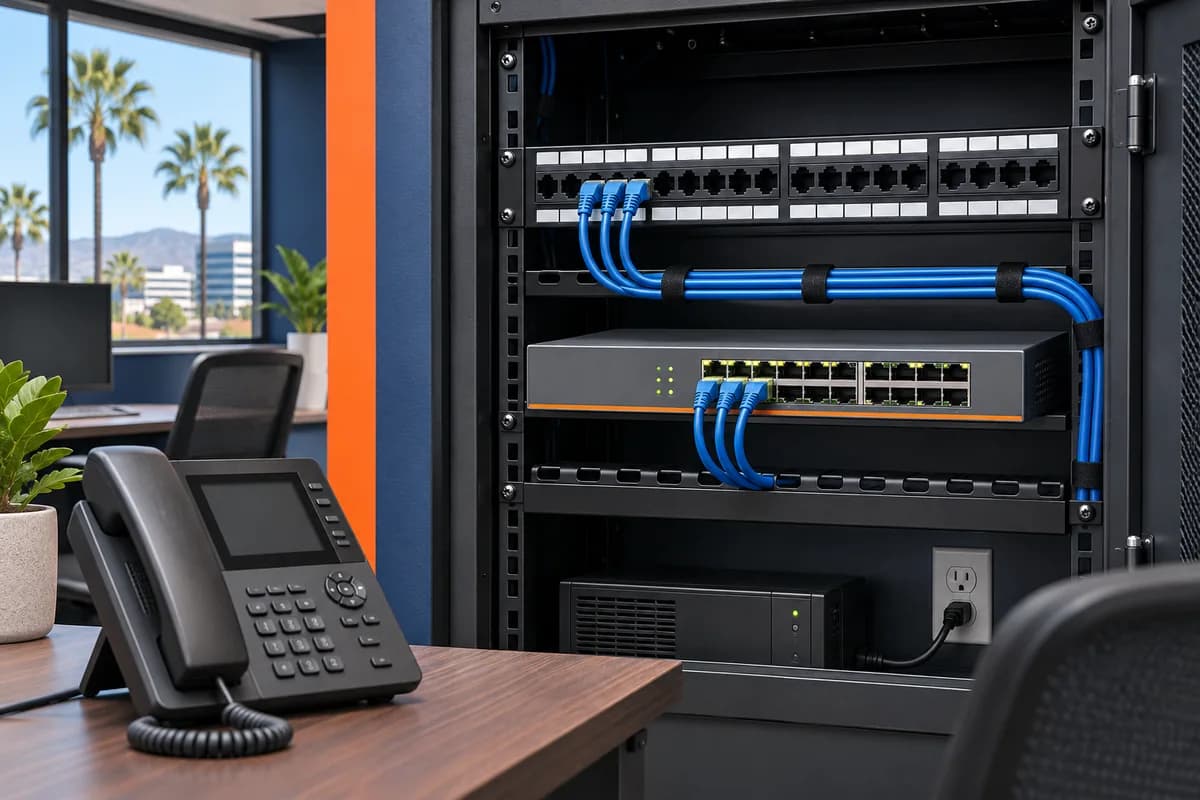
Keep the equipment decision separate from the service decision. A handset may support a feature that the chosen plan does not. A calling plan may support an app that an employee’s device cannot run. A phone may connect to the network but lack a required headset, line key, or update path. The desk phone guide covers those checks in more detail.
Can existing analog devices stay connected?
Some installations use an analog telephone adapter to connect a traditional phone to an IP based service. An adapter converts between the older phone connection and the data network, but it does not guarantee that every function of the old line will work. Ask the provider to identify supported adapters, the specific devices to connect, and which features it will test. The presence of a physical phone jack is not evidence that the new VoIP service uses it.
Make a separate list of fax machines, payment terminals, alarm panels, elevator phones, and other equipment that might depend on a traditional telephone line. Some may need a dedicated line or another solution approved by their manufacturer and service provider. Do not disconnect traditional phone lines until those dependencies have been checked and the agreed replacement has been tested. This is part of avoiding a surprise during a phone system change, not an argument that all older equipment must be replaced.
Is VoIP the same as cloud calling?
No. In a cloud arrangement, the provider manages the central calling platform away from your premises. In an on-premise arrangement, core phone-system equipment remains at the workplace. Either design may use IP voice connections. The names are often mixed in sales material, so ask where the platform is hosted and who maintains it.
For an office with existing equipment, moving to a cloud platform is not automatically the right next step. Review current support, handset compatibility, internet service, and the way calls move through reception and departments. If you want to compare the two approaches as a purchase decision, read the on-premise phone systems and cloud and VoIP service pages.
What should an office check before switching?
Begin with the daily call flow. Count users and simultaneous calls, note the numbers you want to keep, and list reception, shared desks, remote workers, and after-hours handling. Include fax machines, alarms, elevator phones, and other devices that may use a separate line. A switch should not be planned around desk phones alone.
Next, check the actual building. Broadband availability and plan terms vary by address. A speed-test number alone does not describe call quality: congestion, packet loss, unstable Wi-Fi, and local equipment can affect audio. Review network ports, cable condition, switch capacity, and power needs. New or moved workstations may need network and data cabling.
Ask who coordinates number transfer and when the old service may be disconnected. Providers must confirm eligibility and timing for the specific numbers. Plan a small test of inbound calls, outbound calls, transfers, voicemail, and the busiest normal work period before completing a broader change. Do not promise employees that every feature will behave the same way on every device.
How should you judge call quality?
Call quality depends on more than the download speed printed on an internet bill. A broadband internet connection carries voice packets alongside other traffic. If many people use video meetings, upload files, or run cloud software at the same time, a weak link in the local area network or internet path can create delay, uneven audio, or dropped sound. A useful test happens during normal busy hours, using the same phones and connection employees will actually use.
Ask the provider to explain latency, jitter, and packet loss in practical terms. Latency is delay between speaking and hearing a response. Jitter is variation in that delay. Packet loss is missing pieces of the audio stream. A router or switch may be able to prioritize voice traffic, but the provider must confirm whether that helps on the proposed network. Buying more bandwidth alone will not fix a faulty cable, overloaded switch, or unreliable Wi-Fi signal.
Compare the results of a wired IP phone with a computer or mobile device on the office network. If only one user has trouble, check the device, headset, network port, and account. If all users have trouble at once, document the time, number called, and whether the internet connection or other services were affected. These details help distinguish a local wiring problem from a provider issue. They also make a support request more useful than a statement that “VoIP is bad.”
What happens during an outage, and how does 911 work?
If the office loses internet access or electricity, a local VoIP phone may stop working even when the provider’s platform is running. Some services can forward calls or use another connection, but availability and the setup are specific to the provider. Ask what happens to inbound calls, outbound calls, and emergency calling in each outage scenario. Test the agreed plan rather than treating a brochure feature as a guarantee.
Location deserves special care when staff move phones or use apps from another site. The FCC’s VoIP 911 rules identify moved equipment, broadband failure, and power loss as circumstances that can limit emergency calling. Ask the calling provider how to register and update the location for every user and work site and what instructions employees should follow when working away from the office.
Which security questions matter?
A business phone account can be changed or misused if access is poorly controlled. Ask who can add users, change call forwarding, view voicemail, or modify routing. Confirm how accounts are protected, how departing employees lose access, and who receives alerts about unusual changes. Ask the provider what protections apply to signaling and audio, and whether they are enabled for the proposed plan.
NIST’s VoIP security publication explains that moving speech onto data networks brings security considerations alongside its benefits. The publication is technical and older; it supports the principle of reviewing security, not a claim that a particular current product is secure. Your provider should explain its current controls in plain language.
A short set of questions for a provider
- Which company supplies the internet connection, and which supplies the calling platform?
- What phones and apps are supported, and who configures and updates them?
- How will existing numbers transfer, and what is the cutover plan?
- What happens during internet or power loss, and what backup options are included?
- How are 911 locations registered and updated for each work site?
- What are the one-time, monthly, support, tax, and potential exit costs in writing?
- Who handles troubleshooting if a call connects but audio fails?
These answers provide a useful basis for comparing proposals without assuming that the least expensive or newest option is best. The Phone Man of OC can discuss your existing business phone system, building connections, and provider options. Request a free estimate or call (800) 746-6626.
Read the whole proposal, not just the monthly price
Some VoIP services offer features such as call routing, voicemail to email, call recording, video calls, and mobile and desktop apps. The presence of a feature in a platform’s marketing material does not show that it is enabled in your plan or compatible with your equipment. Ask for a written list of included functions, optional licenses, supported devices, and who will configure each one. Ask how many users and simultaneous calls the quoted plan covers.
VoIP service providers may support number porting so a business can keep an existing phone number, but the receiving provider must confirm that the particular number qualifies. Some plans also make it easier to add or remove users as a company grows. Ask the provider to show the actual administration process and any charge for changing the user count. VoIP providers differ in the devices, support, and account controls they offer, so compare written responsibilities rather than assuming similar names mean identical service.
Compare the complete costs: phones or headsets, network equipment, wiring, installation, number transfer, recurring service, support, taxes or fees, and charges for changing or ending the agreement. International calls and special numbers may be priced differently from domestic calls. Some businesses may save money after a move to internet telephony; others first need significant network work. A side-by-side quote based on your actual usage is better than a claim of a fixed savings percentage.
Finally, clarify the support boundary. If the internet connection is supplied by one company and the VoIP phone service by another, who checks the problem first? Who maintains the router, IP phones, and user accounts? Who verifies emergency services information after a relocation? A clear answer can matter more than a feature that sounds impressive but will rarely be used.
FAQ: Frequently asked questions
Is Voice over IP still used by businesses?
Yes. Many business calling platforms use IP networks for voice, although the equipment and provider model vary. Whether it is a good choice for your office depends on its connection, current phone system, and call flow.
How do I know if an office phone is a VoIP phone?
Check the make and model and how it connects. An IP phone typically uses the data network, often through an Ethernet port; an analog handset may connect through a phone jack or an approved adapter. Appearance alone is not a reliable test.
Does VoIP require a particular internet provider?
No single provider is required for every business. Confirm that the selected calling service supports the connection available at your exact address, and ask the provider about its performance and support requirements.
Can I keep my business phone number?
Often, but number transfer depends on the current and new providers and the specific number. Have the receiving provider confirm eligibility and timing before canceling the existing service.
Do I need to buy new desk phones?
Not always. Some platforms support approved existing phones or computer and mobile apps. Ask for the supported device list and confirm each model and needed feature before buying or reusing equipment.
What happens to VoIP calls if the internet or power fails?
Calling at the office may be disrupted. Some plans offer forwarding or other continuity options, but they must be confirmed for the proposed service. Discuss backup power and connection options before relying on them.
Is VoIP the same as a cloud phone system?
No. VoIP describes how voice travels over an IP network. A cloud phone system is one way to manage the calling platform; some on-premise systems also use VoIP.
How does 911 location work with VoIP?
It depends on the provider and setup. Confirm the registered or dispatchable location for each work site and ask what staff must do when a phone or app is moved. Test the provider's instructions before the service goes live.
Technical references: FCC interconnected VoIP definition; Cisco signaling and media guide; FCC VoIP 911 rules; NIST VoIP security considerations. Plan and equipment details vary by provider and site.

Owner, The Phone Man of OC. Read Karl’s author profile.